rusticdoc

Fill Office and PDF templates from JSON.

Write the template in Word, Excel or PowerPoint. One request fills the tags, converts the result to PDF and finishes it, in a single container on your own servers.

Read the quickstartView on GitHub

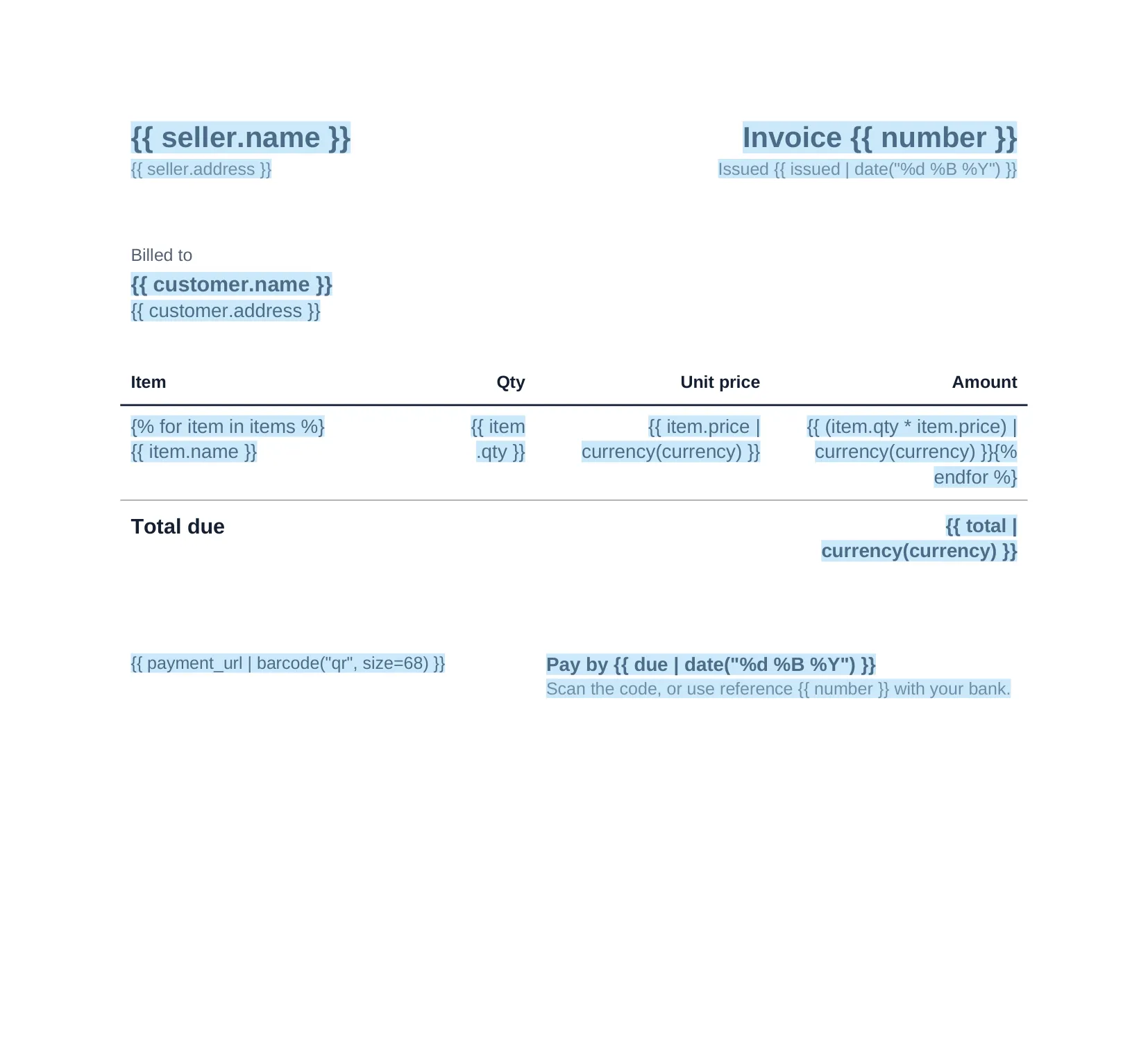
invoice-template.docx

{{ seller.name }}      Invoice {{ number }}
Billed to {{ customer.name }}

{% for item in items %}{{ item.name }}
  {{ item.qty }} × {{ item.price }}{% endfor %}

Total due {{ total | currency(currency) }}
{{ payment_url | barcode("qr", size=90) }}

invoice.json

{
  "number": "INV-2041",
  "customer": { "name": "Amani Otieno" },
  "items": [ 3 items ],
  "total": 36300
}

POST /v1/render

  1. FillTags, loops, the QR code
  2. ConvertLibreOffice, offline
  3. FinishThe steps you list

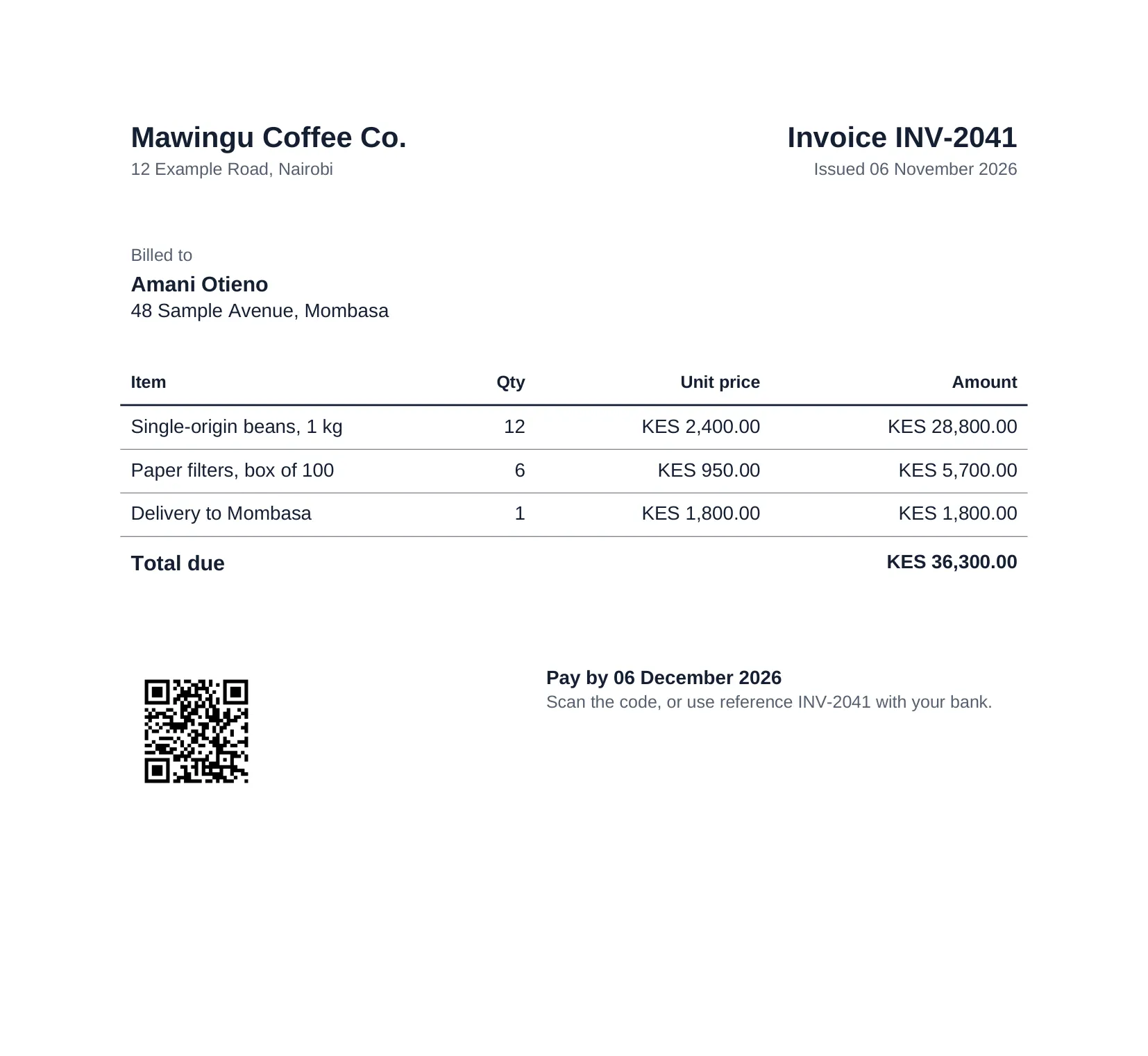
invoice.pdf

This is real output. The blue marks show where the tags are; they aren't in the file. Download the template, the data or the PDF.
An invoice template in Word, with tags such as seller.name, customer.name and a loop over items where the values will go.The same invoice filled in: Mawingu Coffee Co. bills Amani Otieno KES 36,300.00 for three items, with a QR code to pay.

Templates in

  • DOCX
  • XLSX
  • PPTX
  • ODT
  • ODS
  • ODP
  • PDF forms
  • HTML
  • Markdown
  • CSV
  • XML

Documents out

  • PDF
  • PDF/A
  • PDF/UA
  • Factur-X
  • Office formats
  • A ZIP of many

Document generation without document code

The layout stays in a file someone can edit, and your application sends data.

Generating documents in code

  1. Your app
  2. HTML and CSS template
  3. Headless browser
  4. PDF library
  5. Storage or email
  • The layout lives in code, so a changed sentence needs a developer and a release.
  • A browser runs beside your app just to print HTML.
  • Each extra, such as PDF/A or a watermark, is another library to wire in.

With rusticdoc

  1. Your app
  2. One request: a template and its data
  3. The finished document
  • Ordinary documents. Whoever owns the invoice edits it in Word.
  • One request. Fill, convert and finish in one call, or by webhook.
  • No browser. LibreOffice and Fulgur convert, and neither can reach the network while it does.

Made for documents people sign, file and pay

Invoices

Invoices that can be paid

Fill the Word invoice your finance team already uses, print a QR code to pay, and embed Factur-X XML for e-invoicing.

{{ payment_url | barcode("qr", size=90) }}

Reports

Reports from a spreadsheet

Fill rows in an Excel sheet with its formulas still working, add a native chart, then convert the workbook to PDF.

{% for r in rows %}{{ r.month }} {{ r.sales }}{% endfor %}

Forms

PDF forms you were given

Fill the fields of an existing PDF form from JSON, then flatten it so nobody can change the values.

-F template=@application.pdf -F steps=flatten

Building blocks that compose into one request

Use one, or chain them all. Every block works the same in the HTTP API and the CLI.

Tags that survive Word

Tags keep the document’s own formatting, even where Word splits one across runs. Where a loop’s tags sit decides what repeats: text, table rows, paragraphs, sheet rows or slides.

  • Money and dates, formatted your way
  • Conditions, sums and sorting
  • Translations from one template

Template syntax

# A table row in invoice-template.docx, a tag per cell
{% for item in items %}{{ item.name }}
{{ item.qty }}
{{ item.price | currency(currency) }}{% endfor %}

# Elsewhere in the same document
Issued {{ issued | date("%d %B %Y") }}
{% if total > 100000 %}Payment due in 14 days{% endif %}

Run it your way

One image and one binary. Replicas share nothing but a bucket.

One container

Everything the service needs is in one hardened image. No Node, Java or Chromium.

docker run -p 127.0.0.1:9027:9027 ghcr.io/vmosoti/rusticdoc:0.1.0Run it in Docker

Many replicas

Point every replica at one S3 bucket or shared volume. Upload a template to one, and render it from any.

RUSTICDOC_STORE=s3://my-bucket/rusticdocRun many containers

The command line

The same binary renders on your machine or in a CI job, with no server. Converting needs LibreOffice installed.

rusticdoc render letter.txt --data data.json --steps convert -o letter.pdfUse the CLI

Fits the stack you already run

Built to take documents from strangers

A document service reads hostile files by design. These attacks were run at full size against a container limited to 3 GiB, before and after the fixes.

What it protects, and what’s left to you

AttackBeforeNow
40 doublings of a template variableKilled, out of memory413 in under a second
40 concurrent 60 MB uploadsKilled, out of memoryRefused at a 1.31 GiB peak
840,000 same-named form partsNo answer in 150 s400 in 6 ms
Stylesheet link in a converted HTML fileFetched by LibreOfficeNo request leaves
Service secrets in /proc/1/environReadable by LibreOfficePermission denied

Questions

Something else? Ask on GitHub.

Is every feature in the open-source build?

Yes. Everything on this site is in the Apache-2.0 build, including images, barcodes, charts, HTML, PDF forms and webhooks. There is no paid edition.

Can it turn web pages into PDFs?

HTML you write for print, yes: Fulgur lays out its CSS, page rules and images without a browser. Live web pages, no: nothing fetches a URL or runs JavaScript, so a page that needs them needs a tool that runs a browser.

Does it need internet access?

Not to render. Only webhooks and downloadFrom make outbound requests, and RUSTICDOC_OUTBOUND_PROXY can send them through your proxy. LibreOffice can’t reach the network at all.

Is it ready for production?

Version 0.1 is the first release. The service, CLI and template engine are built and tested, but nothing has been opened in Office for Windows or in Acrobat yet. The status page lists what has and hasn’t been checked.

Which scripts and languages can templates use?

Office templates show whatever the installed fonts cover, and you can upload more fonts as a ZIP. Text the service draws into a PDF itself, such as a stamp or a form value, is Latin only for now.

Is there an SDK?

Not yet. Any HTTP client works, since every request is one multipart form, and the OpenAPI description is there to generate a client from.

Fill your first template

The quickstart goes from nothing to a filled invoice in a few commands, with a sample template and data to download.

Read the quickstartSee what’s unproven

# Start the service
docker run -d -p 127.0.0.1:9027:9027 \
  ghcr.io/vmosoti/rusticdoc:0.1.0

# Fill the sample invoice and convert it
curl http://localhost:9027/v1/render \
  -F template=@invoice-template.docx \
  -F "data=<invoice.json" \
  -F steps=convert -o invoice.pdf